LayoutSplat: publications, templates, and file exchange
LayoutSplat v0.11.0 is the SplatWorks publication editor. Open LayoutSplat. Create precise publications locally in your browser. The original six-language picker and shared Apps launcher remain available. DrawSplat remains the whiteboard and its existing tools; SplatWorks is the ecosystem brand.
Illustrated feature guide
Read the 20-section feature inventory with production screenshots. It covers the workspace, all 20 template types, text, graphics, masters, labels, mail merge, imports, suite exchange, digital output and current print limits. The guide covers v0.7.0, with dated workspace screenshots and an updated export screenshot. Publisher compatibility is limited to the tested subset.
Templates
Choose File → Templates. Browse all designs or jump to Avery labels/name badges, business cards, menus, ebooks, or comics. There is one template library, with 169 distinct editable compositions and six publication-language editions. Filter by industry, publication type, orientation, palette, or search. Descriptive card titles identify the design; industry remains a filter. Download a filtered collection as JSON files in a ZIP.
The library includes 12 menu compositions, including café, fine dining, diner, bistro, pizza, bakery, tapas, Asian, coastal, farm, buffet, and hotel layouts. Business cards have six compositions and replaceable logo examples. Other publications also include appropriate branding examples. The SplatWorks example logo can be replaced from its picture context menu. Each counted design has different object geometry. Color and industry variations are customizations, not additional designs. The catalog includes eight flyers (two with ten vertical name/phone tear-off tabs and dotted cutting lines), eight brochures (four trifold and four bifold), six newsletters, six resumes, six photo collages, and six document layouts. Fold guides distinguish equal Z-folds from roll folds with a narrower fold-in flap. Templates use editable original geometry; private Canva and StockLayouts references provided visual inspiration, without copying their artwork or distributing the supplied reference PDFs.
File → Templates → Whiteboard backgrounds & images opens 96 shared classroom organizers, ScratchArt backgrounds, coloring pages and animal pictures. Place a locked page background, an ordinary picture, or fill a selected unlocked picture box. Images are embedded in saved projects and can be undone or replaced. The standalone package includes the collection for offline use.
29 Avery sheet geometries cover 127 product codes, including US Letter and A4, address/shipping/return labels, file-folder labels, and insert/adhesive name badges. Search a product number; label cards lead with Avery stock numbers rather than industries. File → Label sheet & printer alignment adjusts horizontal/vertical printer offsets and the first unused label. Merge fills remaining slots and then new sheets. Print at actual size, without browser headers/footers or scaling. Stock list and measurements.
Page layout, objects, and text
File → Page layout controls page size, margins, columns, rows, baseline guides, ruler origins, bleed, safe insets, and facing pages. Rulers support inches, centimeters, picas, points, and pixels. Units/zoom do not change physical geometry. Preview, Print / Save as PDF, and Design checker are also grouped under File.
The Edit story window has bold, italic, underline and paragraph alignment buttons. Select words before applying inline formatting; drag the title bar to move the window. Applying edits preserves mixed fonts, paragraph spacing, blank paragraphs and indents, and supports undo.
Text flows through linked boxes. Shift-select two or more boxes, right-click, and choose Link text boxes. Unlink splits the chain while retaining text and formatting. A single-box link action lets you choose a target. Continue on next page adds another frame. Supported rich text includes bold, italic, underline, columns, drop caps, AutoFit, alignment/direction, WordArt, and format painting.
Properties offer serif/sans-serif selection, font metrics kerning or no kerning, letter spacing (tracking), word spacing, horizontal text scale, ligatures, and line spacing. File → Import → Fonts accepts local TTF, OTF, WOFF, and WOFF2. Imported fonts are embedded in native saves and portable HTML, and included in Pack and Go. Limits: 16 MB per font, 16 fonts and 64 MB total. Import fonts you are entitled to use. Exact fonts improve metrics, but paragraph composition and unsupported effects can still differ between programs.
Shapes contains rectangles, ellipses, lines, hexagons, arrows, custom paths, and other shapes. Group, align, distribute, rotate, lock, and reorder objects. Layers have transparency sliders: 0% opaque to 100% transparent. Tables, drawing, watermarks, border art, and masters provide reusable publication elements. Picture wrapping is rectangular; wrapped drop caps remain a checker limitation.
Right-click, Mac Control/Command-click, or Shift+F10 opens contextual actions. Import/append text into a text box or replace media in a picture box while keeping its geometry. DOC, DOCX and ODT imports retain supported font sizes/colors, bold/italic/underline, source list numbering, paragraph leading, spacing and indents. Named/default styles and OpenDocument automatic styles are resolved locally. Append preserves existing paragraph formatting. Available imported font families are matched before fallbacks; the report identifies actual substituted fonts or unsupported styles. Text imports support TXT, Markdown, CSV/TSV, HTML text, DOC, DOCX, ODT, and WriteSplat JSON; document tables and page layouts are not placed through this text-box action. File → Import → Microsoft Word accepts DOC/DOCX; LibreOffice Writer accepts ODT. Select an unlocked text box first. Binary DOC uses a local WebAssembly worker with supported combined styles, font families/sizes/colors, list counters and paragraph spacing/indents. Source line leading, fields/hyperlink targets, images and advanced page layout require review. Short compound-file streams are normalized in memory. There is no LibreOffice installation or conversion upload requirement.
Open versus Import
File → Open LayoutSplat project restores this editor's native JSON, .layoutsplat
ZIP, or exported HTML with its native payload. File → Import offers alphabetically
named source formats and converts them into LayoutSplat objects or page artwork.
Native JSON is the lossless format; other applications use different document models.
| Source | Import behavior |
|---|---|
Microsoft Publisher .pub |
Browser WebAssembly decoder; supported editable text, shapes, bitmap fills, crops, gradients, and embedded pictures; retains source bytes |
Apple Pages .pages |
Legacy ZIP/XML documents are parsed locally with text, geometry, paths, styles, and embedded pictures; modern IWA documents require another export |
Adobe Illustrator .ai |
PDF-compatible files become high-resolution page artwork; supported PostScript artwork uses the local converter |
| All supported pages become correctly sized high-resolution artwork, with noneditable text | |
| EPS / PostScript | Local Ghostscript WebAssembly produces first-page flattened artwork; no desktop installation |
| SVG | Supported editable objects; complex effects may need flattening |
| InDesign IDML / Scribus SLA | Editable supported subsets and linked assets in packages; external application validation remains |
| Native QuarkXPress QXP/QXD/QXT | Supported 3.1–4.1 text, frame geometry and vectors; later versions require SVG/PDF interchange |
| Native InDesign INDD/INDT | Native decoding unavailable; use IDML, SVG or PDF. Import errors preserve the current project |
| SplatWorks content | WriteSplat stories, ShowSplat pages, GridSplat/ListSplat tables from their native JSON |
Publisher conversion does not require LibreOffice, a server, or uploads. File → Import → Publisher import settings handles legacy encodings. Input is bounded to 32 MB, with a 45-second timeout and worker cancellation. In-app native PUB export is described below. Preserved crops, paragraph leading/alignment, bitmap fills, and text scaling improve accuracy. Compare source fonts, composition, and unsupported effects before printing. Accuracy findings and remaining work.
Images, video, and suite exchange
Local decoding covers common browser images, TIFF, HEIC/HEIF, PSD composites, and supported EPS/PS. Other image/video containers are attempted through bundled FFmpeg; actual codec and file variant determine support. Layered, multipage, HDR, and color-profile material may be flattened. Media input is bounded to 96 MB; raster pictures to 40 megapixels. Videos retain a print poster and can play in HTML.
File → Import → SplatWorks content places native WriteSplat, ShowSplat, GridSplat, and ListSplat content. File → Export offers those four apps' native JSON. Text stories, slides, and tables are converted; formulas, charts, relationships, and all cell styles are not reconstructed. The conversion report describes omissions. Opening another app's JSON through ordinary project handoff opens that app in an isolated draft. Saving the LayoutSplat original remains the lossless backup.
Merge, saving, and output
Mail merge reads local CSV, TSV, XLSX, and native GridSplat/ListSplat JSON. Choose a worksheet or table. GridSplat formulas and number formats use its actual calculation engine; ListSplat calculations use its own formula syntax, with hidden fields and archived records excluded. Formula errors stop that data source rather than printing incorrect recipients. Map fields, filter, preview, and check records before generation. Labels span sheets and skip used positions. Recipient source tables are not saved in generated templates. Batches are bounded.
Save produces a portable .layoutsplat ZIP. File → Export offers native JSON,
fixed-page HTML, an HTML reading edition, PDF proofs, high-resolution PNG/JPEG,
PowerPoint PPTX, OpenDocument ODP, animated GIF, SVG, IDML, Scribus SLA, suite content,
and Pack and Go. Visual exports support
page ranges; native and interchange projects contain the publication.
PPTX and ODP default to editable objects. Text boxes keep supported inline font/size/color/bold/italic/underline, hyperlinks and paragraph spacing, alignment, indents and direction. Pictures remain separate picture objects with crop/fit, rotation and opacity; common shapes and supported Bezier paths remain vectors; tables retain editable cells. Native slide dimensions match the publication, including optional bleed. PPTX page dimensions must be 1–56 inches.
Master artwork is copied onto each slide as editable objects, respecting overrides. Columns and linked stories become independent text boxes containing the visible fragments on the selected pages; overflow text stays in the LayoutSplat project. Groups become individual objects in their original stacking order. Built-in browser font aliases use the corresponding Liberation Sans/Serif and DejaVu Sans families. Custom font family names survive, but font files are not embedded: install those fonts on the receiving device. Office text metrics and table row heights may differ.
Decorative borders, masked pictures, unsupported PPTX arc paths and complex ODP
gradients become individual picture objects, with each fallback identified in
the conversion report. WordArt/drop caps become ordinary editable text; advanced
character scaling, ligature controls, custom dash patterns and some effects may
differ. The package includes LayoutSplat-conversion.txt, and Download shows its
warnings. Save the native LayoutSplat project for complete story and design editing.
Choose Slide content → Page images — preserve appearance for the previous one-PNG-per-slide output at 150/300/600 ppi. This optional mode preserves the rendered page but does not provide separately editable text or shapes. Resolution affects page images and individual picture fallbacks; native objects remain vectors/text. PPTX/ODP ignore crop marks and ICC profiles.
Animated GIF plays selected pages in page order and loops forever. Choose 0.1–60 seconds per page and a maximum dimension of 480, 720, 1080, or 1440 pixels. A single selected page produces a still GIF. GIF export uses a 256-color palette with dithering and is limited to 24 million total frame pixels; select fewer pages or a smaller size for large publications. Quantization and encoding run in a local worker. Embedded videos and animations use still previews in GIF/PPTX/ODP; use HTML for their original playback. GIF ignores bleed, ppi, crop marks, and ICC profiles; PPTX/ODP ignore crop marks and ICC profiles. All three downloads and file sharing work locally without uploading the publication.
Print / Save as PDF preserves browser-shaped selectable text and vectors. The downloadable PDF proof is flattened. Print preparation includes bleed, crop marks, trim boxes, ICC output intents, and 150/300/600 ppi image output. Pack and Go collects the project, media, fonts, HTML editions, proof, checker findings, and printer instructions. Its optional Ghostscript helper offers PDF/X-3 conversion with independent structural checks for font embedding and Type3 glyph/mapping presence, transparency, uncharacterized RGB, active content, page boxes and source/output/profile hashes. The report records checker and conversion versions. These checks passed for a converted two-page proof; a separate browser proof verifies all 100 linked-story fragments on exactly 100 Letter pages with embedded fonts. Exhaustive PDF/X certification and printer acceptance remain separate validation work.
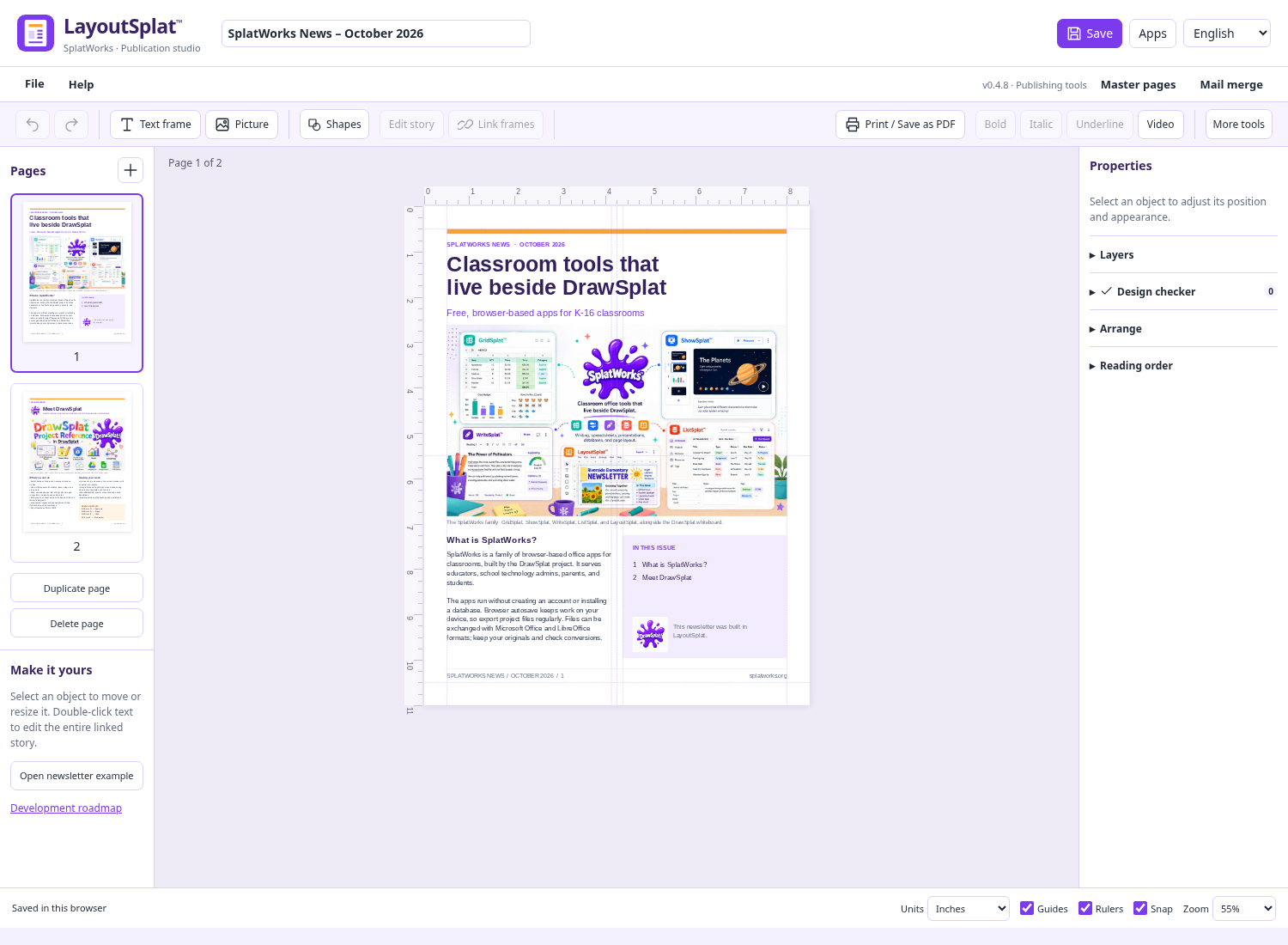
A fresh workspace opens the first two pages of SplatWorks News – October 2026, with its text and illustrations ready to edit. Existing saved publications, recovery drafts and transferred documents take priority. Choose File → Open starter newsletter for a fresh copy; Undo restores the previous publication. Your original imported file remains unchanged. Use File → Save to Google Drive for a native project copy; see the Drive guide. Autosave writes the current draft first, then keeps a recovery copy when browser storage has room. Download a project file for a separate backup.
File → Clear saved browser data clears this workspace's draft/recovery and undo, then reloads a blank publication. Cancel preserves the current work. Other apps' drafts and downloaded projects remain available. Browser drafts are specific to browser/device/domain: save a project before moving from DrawSplat.org to SplatWorks.org.
Installation and roadmap
Serve over HTTP(S), including the supplied loopback launcher for offline use;
direct file:// opening is unsupported. Bundled fonts and decoder workers run locally.
Keep shared assets and the MediaSplat FFmpeg runtime with the app. The current
release packages include a standalone LayoutSplat ZIP, the five-app SplatWorks
suite, and the complete district installation. Downloads.
Milestones 1–2 and the core tools in 3–4 are implemented, including native GridSplat/ListSplat mail-merge sources. The remaining-work checklist prioritizes Publisher typography and linked text flow, native-import coverage and external application checks, richer suite exchange, broader large-document workloads and independent commercial-print/PDF-X validation. Milestone 5 has structural preflight, print preparation and published packages; commercial-printer acceptance and certification remain open. Progress · Approved plan · Library notices.
Ebooks and EPUB
File → Templates → Ebooks adds novel, nonfiction guide and illustrated-book starters. File → Ebook tools adds metadata, heading navigation and a searchable reading preview with Paper/Sepia/Night themes and text size controls. File → Import opens EPUB 2/3 books as native text and pictures. File → Export → EPUB ebook creates reflowable reading content or fixed-layout page pictures. Complete ebook guide.
Publisher PUB export
Choose File → Export → Publisher PUB — native export. The app
writes a Publisher 2000 compound binary file locally; no desktop helper, account
or conversion upload is required. The filename ends in .pub.
Supported Unicode text, character/paragraph formatting, font names, positioned rectangles, ellipses and lines become native editable objects. Masters are copied onto pages and linked stories/columns become independent visible text fragments. Tables, pictures, RTL text and unsupported decorative effects become WMF bitmap pictures on white backgrounds at the selected resolution. These picture objects can move/resize, but their internal text or effects are flattened. White backgrounds can cover artwork underneath; inspect the result. Native font files, live fields, links, original grouping, precise composition and fractional line widths are not reproduced. All publication pages are exported; bleed, crop marks and ICC settings belong to PDF preparation.
The conversion report appears after download and is stored in the compound file. The file also includes the complete native LayoutSplat project. Reopening restores that project only when a SHA-256 fingerprint of the other compound streams still matches. Changes made in another application invalidate that copy and trigger ordinary Publisher decoding, preserving the external edits in the supported subset. This is staleness detection, not a digital signature. Save a native project for complete editing across tools.
Export is bounded to 32 MB, two million visible text characters, 100,000 rich runs, eight megapixels per bitmap and 24 MB aggregate picture pixels. Reduce resolution for picture-heavy publications. Failed exports leave the publication available. Browser tests decode the native streams without the embedded copy and check external-edit detection. LibreOffice 25.2.3.2 opens the exported file with selectable Unicode text, native shapes, bitmap artwork and exact Letter page dimensions. Microsoft Publisher itself has not been tested; acceptance in a particular Publisher version remains an external check.
Large documents and current verification
Unchanged story layouts are reused, including after edits to another story. Font loads, frame changes, wrap images and text/style changes invalidate affected layouts. Page thumbnails render near the visible viewport; full print pages are built for printing, and preview pages only while preview is enabled. A 500-page regression confirms text conservation and reflow of one edited story rather than all 500. This is a controlled browser check, not a guarantee for every complex 500-page publication or independent commercial-printer certification.
Original fonts in Publisher imports
Import your original font files before opening a PUB. Matching family names are retained in the new publication, and regular/bold/italic variants are chosen from the imported files by style. The report lists source families that still needed bundled substitutes. DOC/DOCX/ODT text-box insertion uses the same variant matching. Matching fonts improves metrics but does not guarantee Publisher page composition; advanced source effects and linked flows still need review.
Legacy QuarkXPress native import
File → Import → QuarkXPress opens supported 3.1–4.1 documents/templates locally. Text, frame geometry and supported vectors become editable. The original bytes remain in the native project. QuarkXPress 5+ and the supplied newer private sample are rejected without replacing the current publication; use PDF or supported SVG interchange for them. Linked stories, hyphenation, text paths, external linked pictures and advanced effects still need review. See the matching decoder source and rebuild instructions.
Updating page numbers
Masters → Insert page numbers adds editable folios using {page} and {total}.
Existing folios update when pages are added, duplicated or deleted. Insert again
to change the format or cover new blank pages; it updates existing folios instead
of duplicating them. Editing a folio's story, importing text into it, or linking
it with an ordinary story turns it into ordinary text. Moving a folio into a
master preserves its dynamic format. Each assigned page resolves its own page/total
values without modifying the master template. Hidden master objects stay hidden.
Print, fixed HTML, SVG and editable presentation exports use the resolved values.
HTML reading order
Open Reading order in the properties panel. Choose a text frame, picture or table, then use Earlier/Later or Omit from reading edition. These choices affect the HTML reading edition and Pack and Go reading file; page positions, stacking and print output stay unchanged. Linked stories appear once at their first included frame. Native saves preserve the order and omissions. The reading edition now retains supported inline/paragraph formatting and links. Pale ink is adapted to dark ink against its white reading canvas; the native publication is unchanged. Shapes and master backgrounds remain decorative, separate from the page-content reading sequence.
The expanded 100-page print proof independently conserves all 100 linked-story fragments and 800 body paragraphs, with embedded fonts and exact Letter geometry. The cached 500-page layout benchmark uses newsletter-length copy.
WriteSplat paragraph exchange
Native WriteSplat import retains supported character formatting, paragraph leading, spacing, indents, alignment and blank paragraphs. Ordered/bulleted lists become visible text labels, including starts and item overrides. Previously loaded matching font families/variants remain available to the imported publication.
LayoutSplat exports complete stories to native WriteSplat paragraphs with supported inline formatting, paragraph metrics and tab characters. Font family names survive; embedded font files, custom tab positions, tracking, word spacing and horizontal scaling are not transferred to that editor. Conversion reports identify relevant limits. Paragraph/page composition still follows the receiving application.
v0.7 composition and source books
Text properties include Hyphenation: manual soft hyphens, automatic or off. Automatic English uses bundled American-English patterns locally. Other languages use browser dictionaries when available. Stored text and mark offsets remain unchanged. Line breaks can differ from Publisher's composition engine.
Picture properties offer Around opaque picture edges. LayoutSplat samples the local picture (including fit/crop/mask) into a conservative 16-band contour, with a six-point text gap. Rotation is applied during wrapping. Refresh picture contour updates the saved contour after changing picture content, cropping or fit. Moving/resizing/rotating a frame transforms its saved normalized contour. Transparent holes are not filled with text; text wraps around each band's outer edges. Flow frame earlier/later changes a linked story's frame sequence without moving artwork. Undo and native saves retain both choices.
WriteSplat text exchange retains embedded font files, explicit tab positions, hard breaks and nested semantic list numbering. Fonts must permit redistribution. Page geometry, images/tables and document-specific tools still have conversion limits; inspect each report. Custom tabs resolve against shaped text in the browser.
Desktop SLA/IDML exports include actual desktop font names and portable font files. Scribus checks found and corrected page-center/scratch offsets, missing text-frame paths and missing PostScript font identifiers. These checks establish the tested Scribus workflow; InDesign and Microsoft Publisher acceptance remain separate. See verification evidence and limits.
The ebook guide explains independent page/source editions, XHTML/CSS editing, footnotes, navigation, font retention and export choices.
Comic writing studio
Choose from 19 comic designs, including ten guided storytelling starters and a five-page writing workbook. Insert eight original characters in three poses, and use the bundled Comic Neue font. See the comic studio guide for the exercises and reading credits.
Fiction and nonfiction books
Twelve illustrated book starters include editable covers, titles, contents, chapters and back covers. See the book template guide. Template, character and background filters sort their displayed choices alphabetically.
Photographic placeholders and full text frames
New publication templates use six original photorealistic placeholder photographs, selected to suit the publication subject. Images are embedded as compact JPEGs when a template opens, so saved projects and collection downloads remain portable. Generated photographs are illustrative, not documentary. Reuse information and prompts accompany the bundled images.
Lorem ipsum now fills each template story to the measured capacity of its frames and columns at the template’s font size. Existing saved publications keep their text unchanged. The catalog contains 169 designs, including 15 ebook starters.
Multi-selection font sizing and picture resizing
Shift-click text frames to select several. Use Size (pt) to give their stories a common point size, or A− / A+ to decrease or increase each story by one point while preserving size differences. Mixed sizes show a blank “Mixed” field. Linked frames share one story, so a size change is applied once to that story, including linked continuation frames. Rich-text size differences are scaled proportionally. Manual point-size changes disable shrink-to-fit for those stories so the requested size is visible; the checker flags any overflow for you to resolve.
Shift-click pictures, then drag a corner of the combined selection box. Selected pictures and the spacing between them scale together, preserving their proportions. Mixed object selections can resize in both directions; hold Shift to keep their proportions. Locked and unselected objects stay unchanged. Corner handles support arrow-key resizing, and the numeric properties remain available. Each drag or font-size action can be undone.